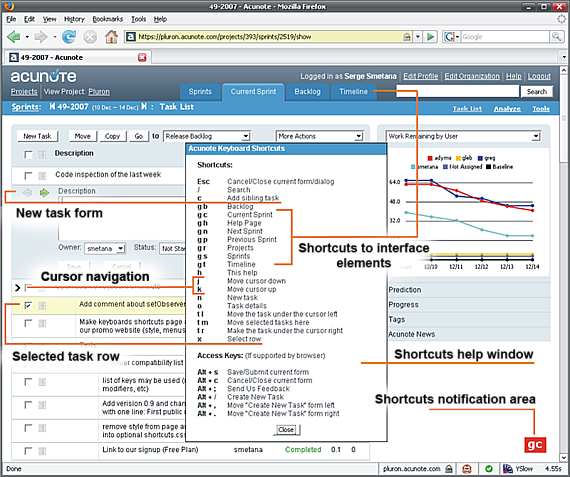
Acunote Shortcuts is a JavaScript library providing everything you need to make add rich keyboard shortcut functionality to a web application. With a few lines of code you can have Gmail-like single and multi-key keyboard shortcuts covering the essential functionality.
Acunote Shortcuts was extracted from Acunote, an online project management application for Scrum, XP, Agile and common sense.
Firefox extension and Greasemonkey script to add keyboard shortcuts to hacker news (news.ycombinator.com), reddit, digg and Redmine:
- Simple to use: just declare a keymap defining what key sequences to bind to what functions and the library does the rest.
- Supports single key (e.g. "j") and compound key sequence shortcuts (e.g. "g i") of any length.
- Supports binding of any letter, number, symbol, punctuation keys. <Shift> modifier is also supported. (e.g. "?").
- Works in Mozilla Firefox 1+, Internet Explorer 6+, Opera 8+, Safari.
- Lightweight, does not depend on any other JavaScript library.
- Visual feedback in the echo area.
- Optional Ruby on Rails helper provides convenient way to define shortcuts from Ruby. Global and page-specific keymap are supported and are merged at the runtime.
- Greasemonkey userscript with an examples of using adding shortcuts to News.YC, Reddit, Digg and Redmine. Includes code to add Gmail-style cursor.
- Open Source, MIT license.
- Download the archive and unpack it to your web site or application directory.
- Include shortcuts library and styles somewhere inside <head> tag.
<script src="shortcuts.js" type="text/javascript"></script>
<link href="shortcuts.css" type="text/css" media="screen"/>
<script type="text/javascript">
var SHORTCUTS = {
    'h': function() { alert('Help!'); },
    'f': {
        'o': {
            'o': function() { alert('"foo" has been typed!'); }
        }
    },
    'b': {
        'a': {
            'R': function() { alert('"baR" has been typed!'); },
            'z': function() { alert('"baz" has been typed!'); }
        }
    }
}
</script>
4. Initialize keyboard shortcuts listener on page load.<body onload="shortcutListener.init();">
Rails helper supports global and page-specific keymaps and merges these at runtime.
This way you can define global shortcuts for the whole site in the layout, and modify them as needed for specific pages. This example uses this functionality.
- Configure global shortcuts in your layout template.
<%
@global_shortcuts = {
:h =>  "alert('Help!');",
:f => {
:o => {
:o => "alert('"foo" has been typed!');"
}
}
}
%>
<%
@page_shortcuts = {
    :b => {
        :a => {
            :R => "alert('"bar" has been typed!');",
            :z => "alert('"baz" has been typed!');"
        }
    }
}
%>
3. Place acunote_shortcuts_helper.rb into you app/helpers directory and include it into ApplicationHelper classmodule ApplicationHelper
include AcunoteShortcutsHelper
end
4. Call render_shortcuts where your javascript code is rendered<script type="text/javascript">
<%= render_shortcuts %>
</script>
Then h and foo will be available for all the pages and one page will have additional bar and baz shortcuts.
This Firefox Extension and Greasemonkey Script add Gmail-style cursor, navigation and post management shortcuts to YCombinator News, Reddit, Digg and Redmine. It includes aconote-shortcuts.js library, and site-specific code to setup shortcuts for each of these.
| Cursor Movement | Notes | |
|---|---|---|
| j | move cursor up | |
| k | move cursor down | |
| Post management | ||
| o, <Enter> | open original post | |
| <Shift>+o | open comments | |
| u | back to news list | |
| Voting | ||
| v then u | vote up | "dig" on Digg |
| v then d | vote down | "bury" on Digg |
| Other | ||
| g then i | open "index" page | News.YC |
| g then n | open "newest" page | News.YC, Reddit |
| g then h | open "hot" page | |
| g then b | open "browse" page | |
| g then s | open "saved" page | |
| g then r | open "recommended" page | |
| g then t | open "stats" page | |
| ? | show help | |
| Redmine specific | ||
| g then p | open "projects" page | |
| g then i | open "issues" page | |
| g then c | open "new issue" form | |
| g then a | open "activity" page | |
| g then s | open "summary" page | |
| g then n | open "news" page | |
| g then f | open "forum" page | |
| g then l | open "files" page | |
| g then r | open "repository" page | |
| g then o | open "roadmap" page | |
| g then w | open "wiki" page | |
| g then t | open "settings" page | |
| ? | show help | |
Ready to use. Just install it.
To use Greasemonkey script with Firefox 2+ install Greasemonkey extension and load Acunote shortcuts userscript. For Safari 3+ install GreaseKit plugin and load Acunote shortcuts userscript.
To add support for a new site:
- download the script source
- copy and paste the DummySource function, rename and adapt it to your needs
- add
@include http://your-site.com*to the list of directives at the beginning of the Greasemonkey script - add your site to the SupportedSites map at the end of the Greasemonkey script
- post your solution to the mailing list and if it's cool, we'll include it in the next Acunote Shortcuts release
Acunote, our project management software, is the best way to see Acunote Shortcuts library in action. Just about everything is accessible through keyboard. Acunote also includes more keyboard features, which will be extracted into the library in the future - advanced list selector (like keyboard feed selector in Google Reader or QuickSilver), Esc listeners, accesskey-based shortcuts, etc.
Acunote Shortcuts framework and Greasemonkey script are released under MIT license. Your contributions are welcome.
Development resources: